
Keeping the Rust Off the Ship: An Automated Weekly Upgrade Watch

TLDR⌗
Vulnerability discovery has gone from a trickle to a firehose. AI models are finding bugs – PHP2Shell is the headline example, a class of critical unauthenticated RCEs in PHP that AI tooling surfaced in October 2026 – and the defenders are struggling to keep up. For a one-person infrastructure like mine, the answer is not to work faster. It is to automate the boring part.
The Weekly Upgrade Watch is an n8n workflow that runs every Monday morning. It reads the running images from my three Kubernetes clusters, checks upstream for newer releases, and hands the facts – versions, dates, security advisories, reported problems, release notes – to a local model (Qwen-3.8-Flash-Next, running through LiteLLM as zeu). The model writes a short assessment for each candidate upgrade: priority, recommendation, security fixes, breaking changes, manual steps. The workflow then files or updates tickets in my personal/infrastructure GitLab project, de-duplicated against what already exists, and emails me a summary.
The crucial design decision is the soak period. A release is not proposed the day it appears. It has to age – seven days by default, ten for LiteLLM – before the watch will recommend it. That is not caution for its own sake. On 2026-10-21, LiteLLM 1.107.0 was compromised in a supply chain attack that distributed an info-stealer. A watch that chased the latest tag would have proposed it. The soak would not have saved me from that particular release – the compromise was discovered within a day – but it is the difference between deploying what upstream shipped and deploying what upstream shipped after the rest of the world had a chance to run it.
This is the first of two articles. The follow-up will describe the Daily Vulnerability Triage – a second automation that watches for CVEs, exploited vulnerabilities, and poisoned releases against what is actually running, and tells me when an urgent action is needed. That one is still being built; this one is about the weekly rhythm that keeps the rust off the hull.
The problem: too many upgrades, not enough hours⌗
I run a small fleet: three Kubernetes clusters (production, development, and a single-node secondary site), a handful of physical machines, and a pile of self-hosted services – GitLab, Nextcloud, SigNoz, Matomo, RabbitMQ, PostgreSQL, the usual suspects. Every one of them releases updates. Some weekly, some daily, some only when there is a security advisory.
A few years ago, this was manageable. I would check for updates when I had time, skim the release notes, and upgrade when something looked important. But the pace has changed. In the last couple of days alone:
- PHP released emergency patches for two critical unauthenticated RCEs in mod_php (CVE-2026-109618 and CVE-2026-109619), the class of bug that PHP2Shell demonstrated AI could find at scale.
- Node.js shipped a security release fixing a high-severity Brotli decoder RCE (CVE-2026-111497).
- GitLab put out a critical patch release for an unauthenticated RCE (CVE-2026-110264).
- LiteLLM had its release pipeline compromised, distributing malware as version 1.107.0 (The Hacker News, The Register).
That is four critical-or-worse events in less than a week, across four different components I run. And that is just the security-driven ones. There are routine upgrades too: RabbitMQ minor versions, PostgreSQL patch releases, Helm chart bumps, end-of-life base images. Each one is a decision: is this worth my time? What breaks? What is the risk of not doing it?
The honest answer is that I was not keeping up. Not because I did not care, but because the discovery half of the job – finding out what needs upgrading, and what the upgrade actually involves – was eating hours I did not have. The actual upgrading is the easy part. Knowing what to upgrade, and why, and what to watch out for, is the work.
The automation: what it does⌗
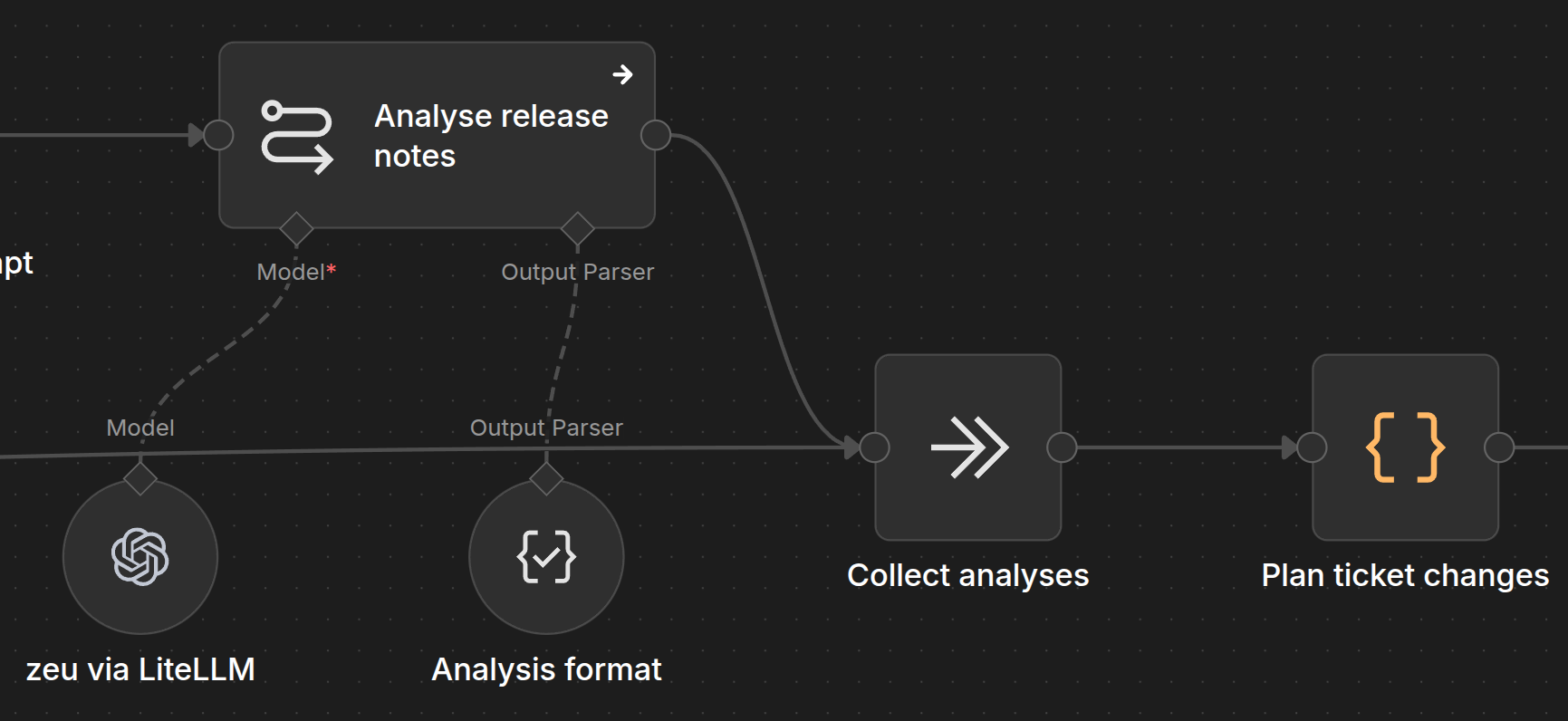
The Weekly Upgrade Watch is an n8n workflow with 38 nodes. It runs every Monday at 08:00 Europe/Bucharest. Here is the shape of it:
-
Read the watchlist. A JSON file in the infrastructure repo lists every component I want watched: what it is, how it is deployed, which GitHub repo tracks it, what Helm chart packages it (if any), how many days it should soak before being proposed, and any operator’s notes.
-
Find existing tickets. Before proposing anything, it queries GitLab for open tickets labelled
upgrade. This is the de-duplication memory: if a ticket already exists for an upgrade, the watch updates it rather than opening a duplicate. -
Inventory what is running. Three HTTP requests – one per cluster – read
/api/v1/podsfrom the Kubernetes API (a recent change, issue #71; previously this came from SigNoz metrics, which worked but could not see things like digest-pinned images or unmounted PVCs). A Code node reduces the pod lists to image/tag/digest rows and reports any cluster it could not reach. -
Resolve running versions. For each watchlist entry, it matches the running images against the watchlist patterns and determines the oldest running version – the one that matters for “are we behind?”.
-
Fetch upstream. GitHub GraphQL and REST calls pull the release history for each component’s repo: versions, dates, release notes, archived status. Helm chart repositories are queried via Artifact Hub for chart versions. End-of-life data comes from endoflife.date. Security advisories come from the GitHub Advisory Database.
-
Assess upgrades. A Code node computes the candidates: for each component, the newest release that is outside its soak period, plus any release that fixes a high or critical advisory affecting the running version (the security exception to the soak).
-
Analyse with the model. For each candidate, a Code node builds a prompt (more on that below) and sends it to
zeu– my local Qwen-3.8-Flash-Next model, served through LiteLLM. The model returns a structured assessment. -
Plan ticket changes. Another Code node turns the assessments into ticket operations: create a new issue, update an existing one, or close one that is no longer relevant.
-
Write to GitLab. MCP client nodes call the GitLab API to create, update, or comment on issues in my infrastructure repo.
-
Email the summary. The workflow composes a Markdown report, converts it to HTML, and sends it via Mailgun. If anything fails, an error trigger sends a failure alert.
The whole thing takes about 25 minutes, most of which is the model thinking. It runs while I am having breakfast.
Feeding the model: mechanical data, not rediscovery⌗
Here is the design principle I care about most: the workflow does the data gathering mechanically, and the model only reasons.
The first version of this idea – not this workflow, an earlier experiment – gave the model a pile of tools and asked it to figure out what was running and what needed upgrading. It was slow, it was non-deterministic, and it kept rediscovering the same things every run. The model would spend half its output budget just listing pods.
The current design inverts that. The workflow establishes the facts before the model is called:
- What is running, on which cluster, at which version and digest (from the Kubernetes API).
- What the upstream releases are, when they shipped, and what their release notes say (from GitHub).
- What security advisories affect the running version (from the GitHub Advisory Database).
- What Helm chart version ships the target release (from Artifact Hub).
- Whether the upstream repo is archived, and whether the version line is end-of-life (from endoflife.date).
- What problems other people have reported since the target was released (from GitHub issues).
All of this is assembled into a Facts section in the prompt. The model never has to go looking for it. It can, if it wants – the prompt mentions the upstream repository, and the model has access to tools through the MCP gateway – but it does not need to. The basic dataset is reproducible and discovered mechanically, every week, the same way.
This matters for two reasons. First, reliability: a workflow that depends on the model remembering how to query the Kubernetes API is a workflow that breaks when the API changes, or when the model hallucinates a kubectl command. Second, cost and latency: every token the model spends on data gathering is a token it is not spending on reasoning, and a prompt that starts with “go figure out what is running” is a prompt that takes three times as long.
The prompt⌗
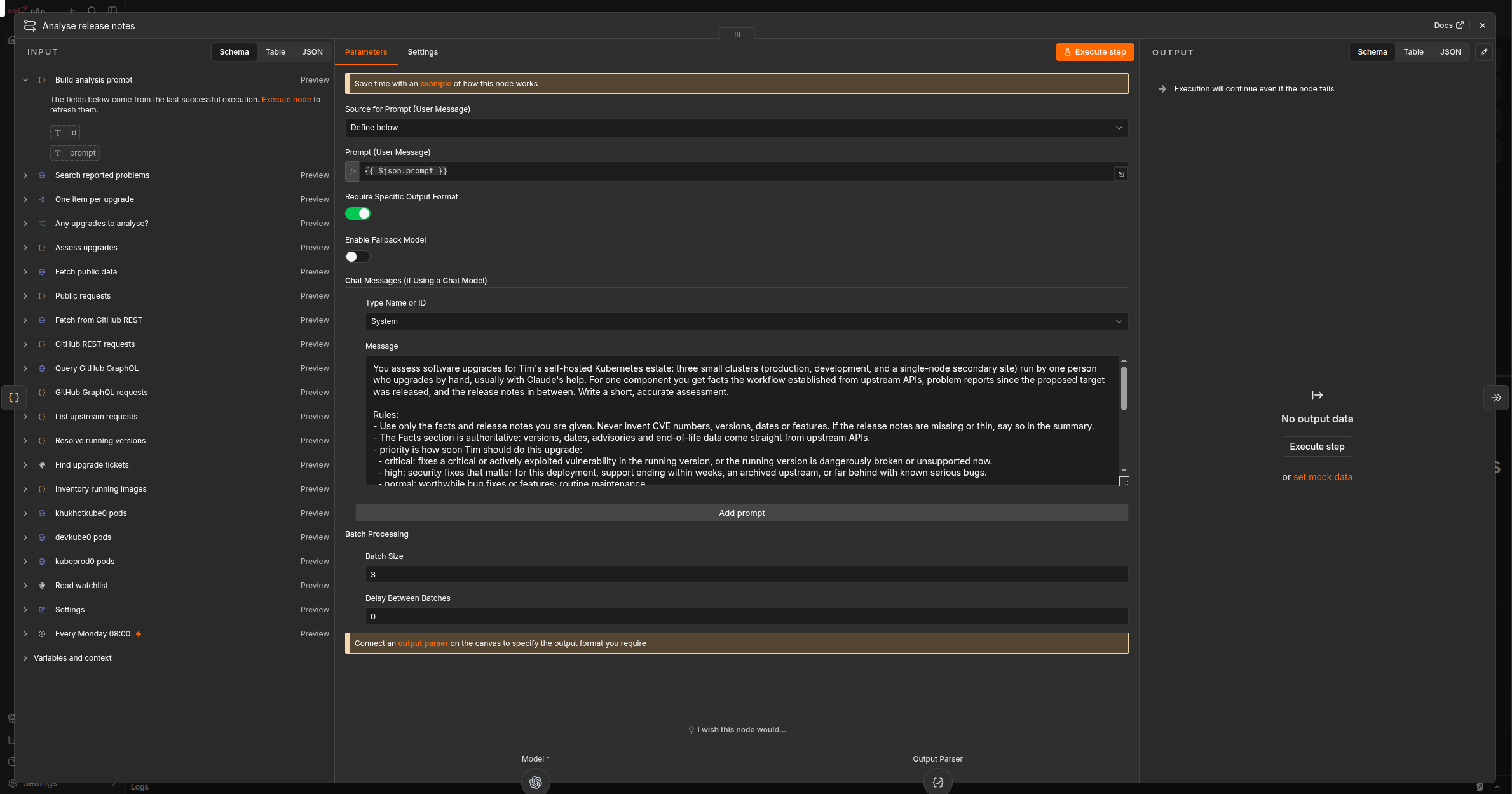
The system prompt is short and prescriptive. It tells the model it is assessing upgrades for a one-person self-hosted Kubernetes estate, and gives it rules:
- Use only the facts and release notes provided. Never invent CVE numbers, versions, dates, or features.
- The Facts section is authoritative.
- Priority is one of
critical,high,normal,low, with definitions: critical means a critical or actively-exploited vulnerability in the running version, or the running version is dangerously broken or unsupported. High means security fixes that matter for this deployment, support ending within weeks, an archived upstream, or far behind with known serious bugs. And so on down to low. - The workflow enforces a “priority floor” computed from the facts – the model cannot argue below it, only above, with a reason.
- Recommendation is
upgrade,wait(when a newer release still in its soak period fixes something serious in the target), orhold(only when reported problems describe serious regressions). - The output is structured:
priority,priority_reason,recommendation,recommendation_reason,summary(two to four sentences of plain British English),security_fixes,breaking_changes,manual_steps,notable_changes(at most five).
The user prompt is assembled per candidate and has three sections:
# {Component}: {current version} -> {target version}

## Facts
Component: {name}
How it is deployed: {helm chart / docker / systemd / ...}
Operator's notes: {free-text notes from the watchlist}
Running: {cluster/namespace: tag, ...}
Version to upgrade from (oldest running): {current}
Proposed target: {target.version}, released {target.date} ({age} days ago)
Helm chart {package} version shipping the target: {chart version}
...
Security advisories affecting the running version:
- critical: CVE-2026-XXXXX {summary} (first fixed upstream in {version})
- plus 3 high, 12 medium severity advisories
Priority floor set by these facts: {level} ({reasons})

## Reported problems since the target's release
{GitHub issues mentioning the target version, with state, title, comment count, labels, URL}

## Vendor patch-release announcements newer than the running version
{RSS/Atom feed hits, if any}

## Release notes
===== Release {version} ({date}) =====
{Release notes, trimmed to fit the model's context budget}
The release notes are trimmed intelligently: the target release gets the most space, then each new minor or major, then patches in the running line, then everything else. A component that has shipped forty patch releases since the running version does not get forty full sets of notes – it gets a summary line like “3.3.x: 3.3.5 (2026-08-01) to 3.3.16 (2026-10-15), 12 releases” and the full notes for the ones that matter.
The model configuration is zeu (Qwen-3.8-Flash-Next) via LiteLLM, with maxTokens: 65536, temperature: 0.3, and a 20-minute timeout. The high token limit is deliberate: the model thinks before answering, and a long prompt makes it think longer. An early run with a 20000-token limit spent the entire output budget thinking about 30k-character prompts and produced nothing. 65536 leaves plenty of room.
The soak period: why not just deploy the latest?⌗
This is the part I would push back on if someone asked me to remove it.
The naive automation is: check for new releases, deploy the newest one. That is what a lot of “auto-update” tooling does. It is also how you end up running a compromised package.
On 2026-10-21, LiteLLM’s release pipeline was hacked. Version 1.107.0 on PyPI was not LiteLLM – it was an info-stealer that hoovered up passwords, API keys, and secrets from every environment that installed it. The compromise was discovered and the release pulled within about a day. But “within a day” is forever if you auto-deployed the minute it appeared.
The soak period is a simple, blunt instrument: a release is not proposed until it has existed for N days. Seven days by default. Ten for LiteLLM specifically, because I have been burned by it once already and I do not trust its release pipeline the way I trust, say, PostgreSQL’s. The idea is that in those seven days, someone else runs it first. The bug reports appear. The malware scanners flag it. The typosquat gets noticed. The release gets pulled, or a fixed version replaces it.
There is one exception, and it is deliberate: if a release fixes a high or critical security advisory affecting the running version, the soak is waived. A critical RCE in the thing you are running is not something you wait seven days to fix. The workflow marks these candidates with “proposed before the usual soak period because it fixes a high or critical advisory” so I can see at a glance that the soak was overridden and why.
The soak is not a guarantee. A supply chain attack that stays hidden for eight days will sail through it. But it converts “deploy whatever is newest” into “deploy what the rest of the world has had a chance to test”, and in a month with four critical security events, that difference is the difference between a quiet Monday and a very bad week.
The output: email and GitLab tickets⌗
The workflow produces two outputs.
Email. Every Monday, I get a summary in my inbox: what was assessed, what was proposed, what was recommended for upgrade, what was held, and why. It is a Markdown report converted to HTML, structured so I can skim it in two minutes. The email is the human-facing surface – it is where I see the shape of the week.
GitLab tickets. The more important output. For each proposed upgrade, the workflow creates (or updates) an issue in my infra repo, labelled upgrade and priority/{level}. The issue body is the model’s assessment: running version, target version, priority, recommendation, summary, security fixes, breaking changes, manual steps. The workflow de-duplicates: if a ticket already exists for the same component and target, it updates the existing ticket rather than opening a new one, and it closes tickets whose target has been deployed.
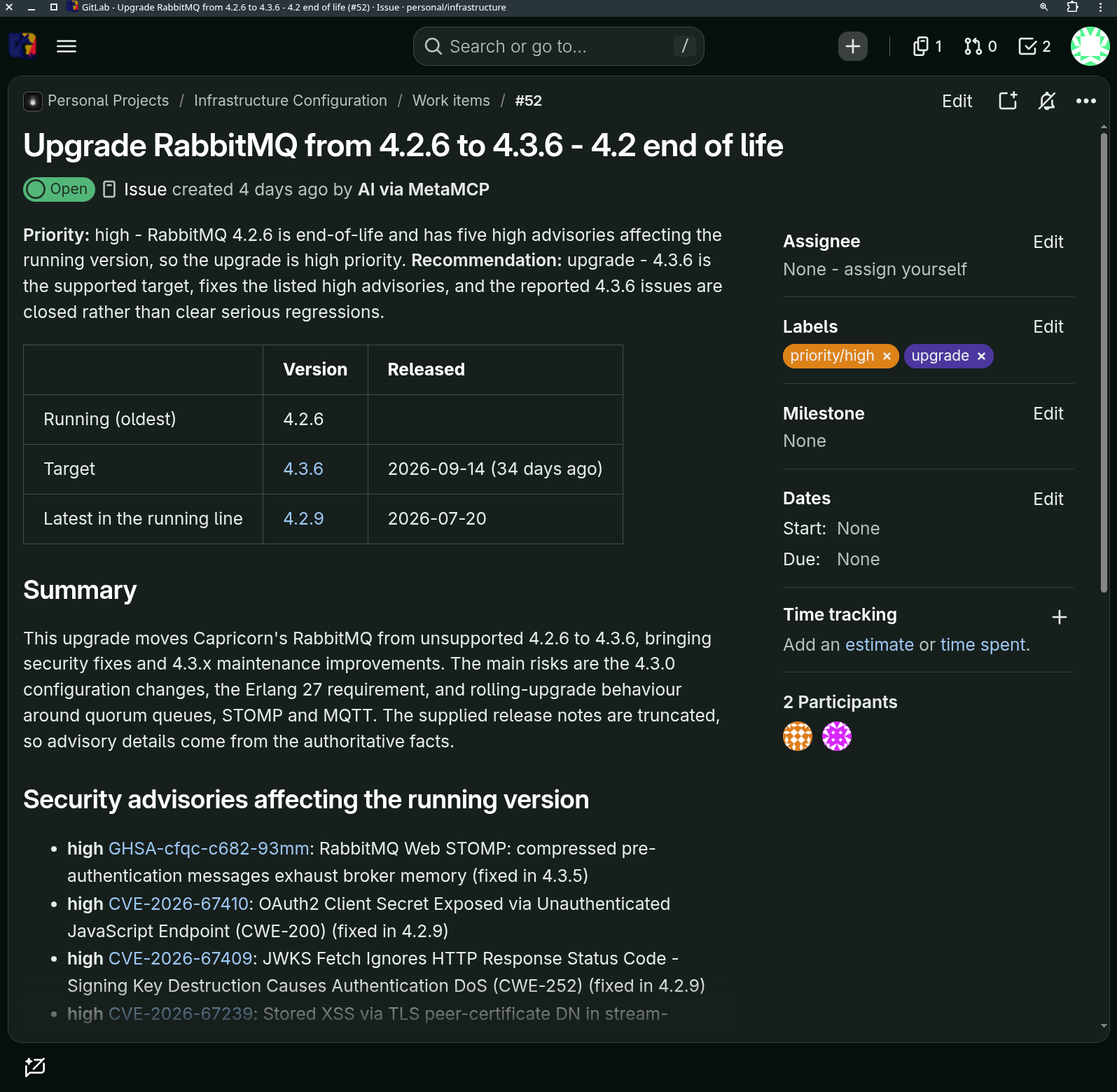
This is the part that makes the automation actually useful. The tickets are the work queue. They persist. They accumulate context – comments, links to the release notes, references to related issues. And because they are in GitLab, I can see them alongside the rest of my infrastructure work, assign them, close them, and track what has been done.
As of today, the automation has filed 21 upgrade tickets in the project, ranging from routine chart bumps to critical security patches. Some examples:
- #70: Whiteboard server running an 8-month-old
stableimage with an end-of-life Node 25.6.0, missing a critical Brotli decoder fix. Found by the watch, though it also documents a gap: floating tags count as the newest release in their line, so the watch did not flag it as an upgrade candidate until I looked at the CVE. - #54: SigNoz 0.141.1 -> 0.145.0. Routine, but the kind of thing that would otherwise sit at “I should upgrade that sometime” for months.
- #50: PostgreSQL 14 -> 18.6 for the Nextcloud database. A major version upgrade, with manual steps documented: backup, CloudNativePG cluster import, verification.
The development of the automation itself is tracked in the same project. Recent commits show the evolution: reading pod lists from the Kubernetes API instead of SigNoz, increasing the model’s output limit, tracking the x509 certificate exporter in the watchlist, letting an entry ignore advisories about other packages in its repository. It is a living system, not a finished one.
What it does not do (yet)⌗
The Weekly Upgrade Watch is deliberately conservative. It proposes upgrades. It does not deploy them. It does not handle node-level software (Ubuntu, kubelet, containerd, the Synology DSMs). It reads one advisory source (GitHub) for the security exception. It runs once a week, which means a critical CVE disclosed on Tuesday waits until Monday – unless I read the news and file the ticket by hand, which is what happened with GitLab #67 and PHP #65.
Those gaps are exactly what the follow-up article will cover. Issue #69 in my infra to-do list describes a Daily Vulnerability Triage: a second n8n workflow that runs every morning, reads the same inventory, and checks it against multiple vulnerability sources – GitHub advisories, OSV (which aggregates MAL- malicious-package entries that never get a CVE), CISA’s KEV catalogue for exploited-in-the-wild flags. It never proposes an upgrade; it files and prioritises findings, and links the component’s upgrade-watch ticket when one exists.
The motivation is latency and coverage. The weekly watch saw the LiteLLM compromise only as a reason to upgrade. It would not have seen it as a poisoned release. The daily triage is meant to catch that class of thing: no CVE, no GitHub advisory on day one, just a release that should not be trusted. That is a different problem, and it needs a different automation.
Where this lands⌗
The Weekly Upgrade Watch has been running for a few weeks now. It has filed 21 tickets, of which several have been completed and the rest are queued. It has not filed a bad recommendation that I can remember – the worst outcome has been a “normal” priority that I disagreed with, and the ticket format makes it easy to close with a comment saying why.
The honest assessment is that the automation does not save me time on the decisions. I still read every ticket, and I still make the call on whether to upgrade this week or next. What it saves me is the discovery – the hours of checking release pages, reading changelogs, cross-referencing advisories, and wondering whether I had missed something. That is the part that was falling through the cracks. The part that was actually costing me sleep.
And there is a quiet benefit: the tickets are a record. Six months from now, when I wonder why I upgraded RabbitMQ to 4.3.6, or what CVE was in that PHP release, the answer is in GitLab. The automation is not just a work queue. It is the memory of what my infrastructure was, and what it needed, and when.
If you are running anything at all – a homelab, a small business, a side project with a VPS – and you are not automating the discovery half of maintenance, I would start there; knowing what needs your attention is the hard part. Letting a workflow tell you, every week, in the same format, with the same rigour, is the closest thing I have found to a maintenance habit that actually sticks.
The follow-up article, on the Daily Vulnerability Triage, will be along when it is built and has some mileage. Until then: keep the rust off the ship.
Disclosure, in the spirit of transparency about AI use: this post was drafted by Mistral’s Le Chonk model – Mistral Large 4, accessed via LiteLLM as le-chonk, as described in the previous two blog posts – which also researched the n8n workflow, read the GitLab project history, and wrote the first draft. Tim supplied the opinions, the soak-period philosophy, and any mistakes or hallucinations are probably his as well. The cover image is from the ComfyUI deployment on the same cluster, as before: Le Chonk wrote the prompt, and Z-Image Turbo obliged.